Kindle’s Customers Strike Back


Fix_it

Kindle Cloud Reader in a nutshell

Those of your who buy e-books at Amazon must be aware of Kindle Cloud Reader application that provides you with a way of reading Kindle e-books through the browser at any place you like it.  May it be a mobile phone,  a tablet or a desktop.

Finding, buying and reading e-books is much more easier than their paper counterparts and you do not have to carry tons of books at your bag to read a few at once. In addition, digital format make it simple to look up words in a dictionary or on the internet, for instance, using Google Translate or Google search.

However, this is not the case with Kindle Cloud Reader. Currently, the is no built-in internet search or internet translate functionality in the Kindle Cloud Reader. More over, there is no option to copy and paste your favorite quotes or text snippets neither. If you’ll search at various forums you’ll see that customers desperately looking for, at least, copy functionality.

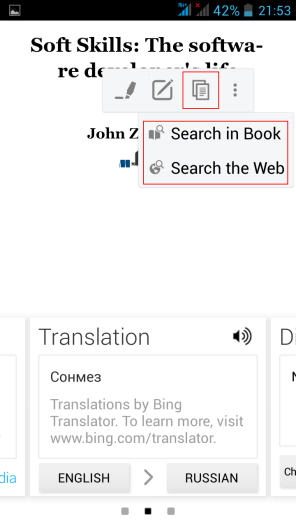
It is a very strange state of things, considering that this functionality very much exists in Android powered Amazon Kindle application as your may see in the screenshot below.

So what’s the matter with Amazon?

As a persistent Amazon customer who is pretty satisfied with their services I thought that the lack of this functionality is a mere unawareness to this issue from Amazon’s side. That is why I wrote them asking to fix this annoying discrepancy on July, 2015. And this is the answer I got.

Amazon

Your Account Amazon.com

Message From Customer Service

Hello,

I understand Kindle for android do not have the feature mentioned by you but I do not know that exact reason why the Kindle developers team have not involved these features on Kindle for Android app.

I understand that you are interested in these features on your Android device. Definitely this feature would be of great help to our customers if it is available. It’s unfortunate that this feature is not available right now.

I’m glad that you’ve contacted us about this feature request. I also apologize to let you know that right now, we don’t have this feature in use.
Since you’re interested in this feature, I’ve passed your message to the Kindle development Team for review and consideration. I’m sure that these features on Kindle for android device will make our customers Kindle experience more convenient.

I want to let you know that we are working on additional feature for our Kindle as part of the next software. Please be assured that your feedback will be considered as we plan further improvements.Your patience and co-operation is highly appreciated in this matter.

I once again apologize for not assisting you in this issue as the feature is not available now. But your feedback will be of great importance for us now and we will definitely try to bring this feature soon.

For the meantime, please extend with us your patience and understanding while we work on this.

Please know that we value our customers satisfaction and convenience above all else it’s the foundation on which our company was built.

If you need any further assistance please write to us :

http://www.amazon.com/kindlesupport

Thanks for using Kindle. Have a pleasant day ahead!

Best regards, Noel S

As you may see customer support has provided no clue when it’ll be done if ever. Not to mention that they mistakenly answered me about Android application, which has this functionality built-in, when I asked about Kindle Cloud Reader. Since then almost 2.5 years have passed.

Facts

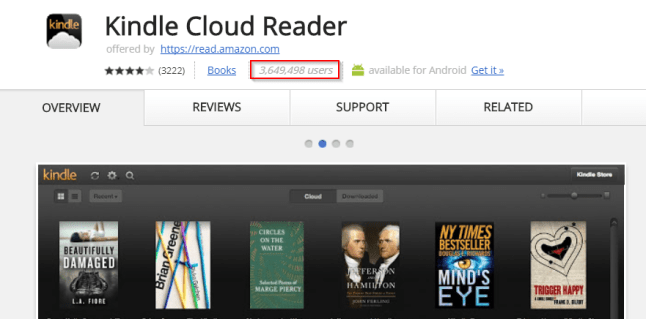
  • As of today Kindle Cloud Reader Chrome extension is used by 3,649,498 users world wide. This is a large amount of user I would say.
2017-10-13 01_13_47-Kindle


  • There is no support for basic features, such as copy, internet search, internet translate in Kindle Cloud Reader.
  • Amazon Kindle application has those features built-in as you may see in the screenshot below and has only 739,148 user so far.
Screenshot_2016-04-18-21-53-48

  • Implementation of the proposed functionality must take a few hours for Amazon’s developers.

Why am I so sure that it takes a few hours to fix this?

I am sure that fixing this will take between two to three hours because due to the lack of this functionality I had to implement it myself. Thanks to this open source repository  I was able to add Google Search and Translate, Copy functionality to Kindle Cloud Reader application. It is currently used by about several thousands users weekly. This amount indicates that these functionalities are needed by customers. However, since I do not understand deeply the design of the Kindle Cloud Reader it is pretty complicated to refactor this application further. In my opinion, this is exactly where Amazon must step in and introduce the fix. 

Meanwhile

Meanwhile, use Kindle Optimizer Chrome Extension if copy, search and translate is what you lack.

Check out the implementation at GitHub.

MagLev Is Like Magic!

It’s a kind of magic

If you haven’t heard yet about Magnetic Levitation then check out the video of my final project for a BSc. in Electronics back in 2011 that did just that.

There are a number of types of magnetic levitation and you may find a lot of peculiar videos about it on YouTube. In addition, don’t miss this MagLev World Record video.

How does it work?

Specifically in my own project the maglev was implemented using digital controller that controlled the magnitude of current flowing in the electromagnet as a function of distance of a floating object from electromagnet steel core. A Hall effect sensor, actually, two of them were placed at opposite sides of electromagnet core and provided the readings of the magnetic field surrounding the electromagnet.

With a help from my friends

I’d like to thank once again Mr. Arie Shnaiderman an outstanding control engineer at ReWalk company who helped me make this instrument a real thing.

Century of Aviation at Your Fingertips

Great news!

For those of you who are interested in aviation and space there are great news because Aviation Week & Space Technology magazine in partnership with Boeing released a digital archive of the Aviation Week & Space Technology magazine.

This digital archive is very nicely composed and easy to navigate. In addition now it is easier than ever before to follow the history of aviation, space exploration, computers evolution and do historical research based on this archive.

Stealth evolution

If you are interested in stealth technology evolution such as F-117A, B-2, YF-23, YF-22 and more throughout the years ‘Search’ functionality will help you find pieces of information here and there across the issues of the magazine.

Lean back

And just enjoy the capabilities.

Gravitational Waves Discovered

And so it begins …

This post is a  very special one due to the fact that on 2/11/2016 it was announced that long ago predicted from General Relativity Theory gravitational waves were detected by

Laser Interferometer Gravitational-Wave Observatory  (LIGO) in USA.

This is the most exciting discovery of the 21st century so far and its consequences are hard to predict. What is for sure that now we have a mean to probe what happens in the places such as where black holes collide.

I congratulate all of humankind with this achievement that is a great example of science teams collaboration around the world that is a way to go.

Resources you won’t want miss

  1. An interview with the Kip Thorne the genius behind the machines that made it a reality.
  2. Video from Washington’s National Science Foundation press-conference were this announcement was made.

Taken by the Swift

swift

Swift is here to stay

This post was inspired by a one day Swift crash course. I have to tell you that Swift is a very nice language with impressive syntactic structures that turn iOS/ OS X development into very joyful experience in comparison to Objective C.

What is also very encouraging about Swift that its core is opened source by Apple and the source code is available at GitHub. In addition, development in Swift is now possible not only under OS X, but also on Linux (Ubuntu). It is also possible to develop in Swift on Widows with OS X running under Virtual Machine, but about this later.

Current version of Swift is 2.2 and 3.0 is about to be ready later this year (2016).

Introduction from Swift.org site

About Swift

Swift is a general-purpose programming language built using a modern approach to safety, performance, and software design patterns.

The goal of the Swift project is to create the best available language for uses ranging from systems programming, to mobile and desktop apps, scaling up to cloud services. Most importantly, Swift is designed to make writing and maintaining correct programs easier for the developer.

Playground

1. IBM Swift Sandbox

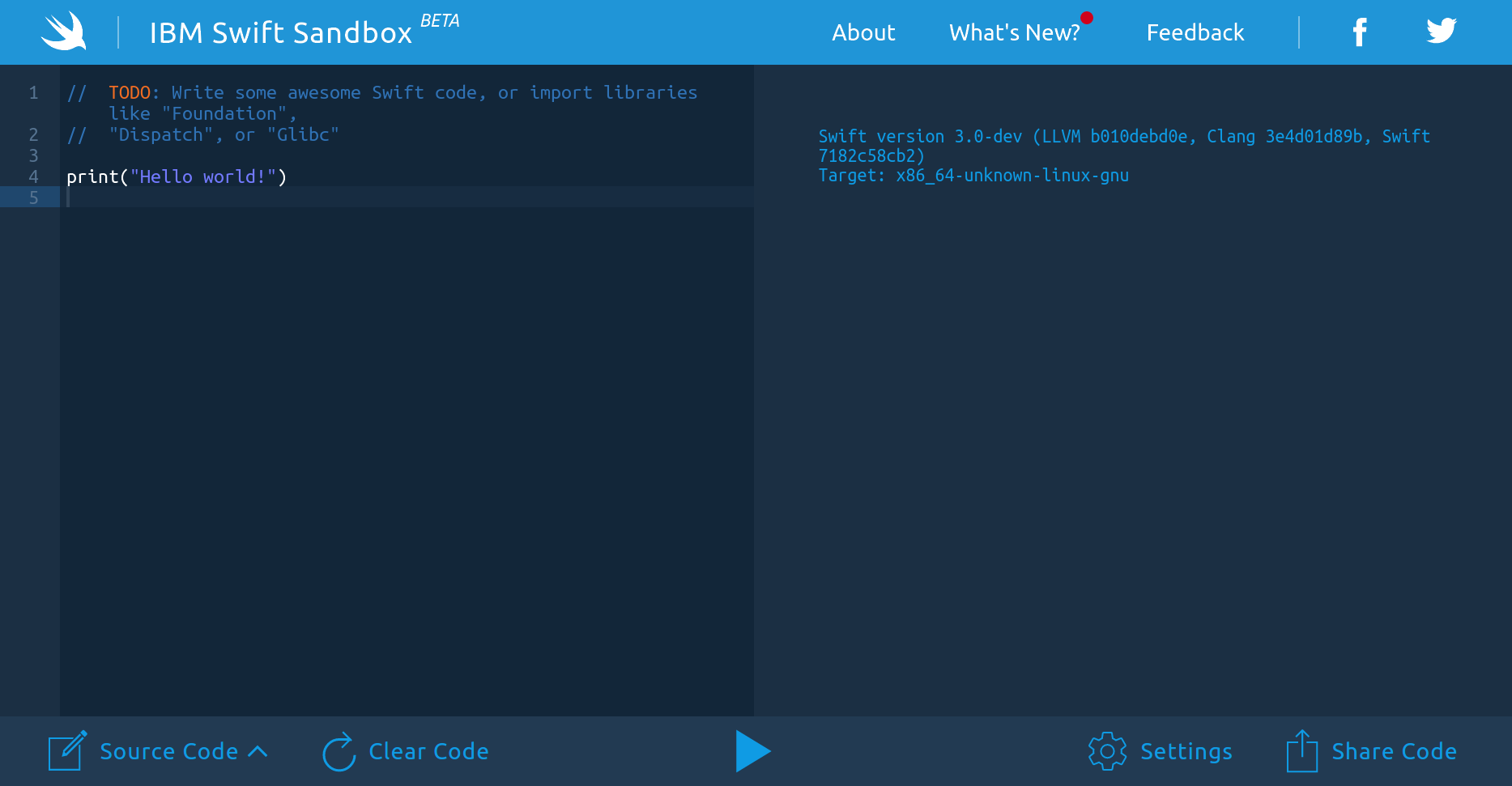
There are a number of ways to start playing with Swift. The most generic one is to use IBM Swift Sandbox web site for this matter. It makes it possible to try Swift out without buying Mac or installing VM with OS X/Ubuntu or installing Ubuntu itself.

OK. When you are at the site what you see is REPL running on Linux. And it looks just like this. And it’s kind of interpreter for Swift.

ibm_santbox


2. Swift on Linux (Ubuntu)

Currently Swift is supported on Ubuntu 14.04 and 15.10. In order to play with Swift on Ubuntu please follow very detailed how to guide from official Swift site here.

3. Swift on Windows in OS X Virtual machine 

As of today Swift is not supported on Windows so Windows users must use virtual machine running Ubuntu in order to be able to develop application in Swift. On the other hand one may develop natively in Swift with VM that runs OS X on it. To be able to do this please use this YouTube detailed tutorial.

Main steps are

  1. Install free VMware Workstation Player
  2. Download OS X image from the link in the tutorial description in YouTube
  3. Install VMware customization batch file.
  4. Configure VM and run OS X under it
  5. Create Apple account in order to be able to download XCode via App Store.

4. Swift on OS X with XCode (pretty expensive for those of us who have no Mac)

If you already posses a Mac then it is easy to install Swift in accordance with the steps below from official Swift site.

That’s it and stay tuned. 

Java Code Geeks

Mono on Linux and feeling good

Mono, mono

If you haven’t heard about Mono on Linux then it is time to fill this gap.
Mono is an open source platform that implements CLI specification and enables building and runnig C# applications on Linux, OS X, Windows which is fun.
This is the official description from the site

Mono, the open source development platform based on the .NET framework, allows developers to build cross-platform applications with improved developer productivity. Mono’s .NET implementation is based on the ECMA standards for C# and the Common Language Infrastructure.

Starting fast

In order to start playing with Mono fast there is a need to install three things.

Linux

  • You need to have Linux (Ubuntu) installed on you PC (vm). It is possible to work with Mono on Windows too.

Mono

  • You need to install mono on you system with these commands in the terminal
sudo apt-key adv --keyserver keyserver.ubuntu.com --recv-keys 3FA7E0328081BFF6A14DA29AA6A19B38D3D831EF

echo "deb http://download.mono-project.com/repo/debian wheezy main" | sudo tee /etc/apt/sources.list.d/mono-xamarin.list

sudo apt-get update

sudo apt-get install Mono-Complete

MonoDevelop

  • Now to be able to code and build C# projects there is a need to install cross-platform IDE for C#, F# and more, such as MonoDevelop.
sudo apt-get install monodevelop
  • After monodevelop package installation simply type in terminal ‘monodevelop‘ for IDE to startup.
  • To learn to use this IDE you may refer to this Xamarin Studio documentation.

 Mono, mono?

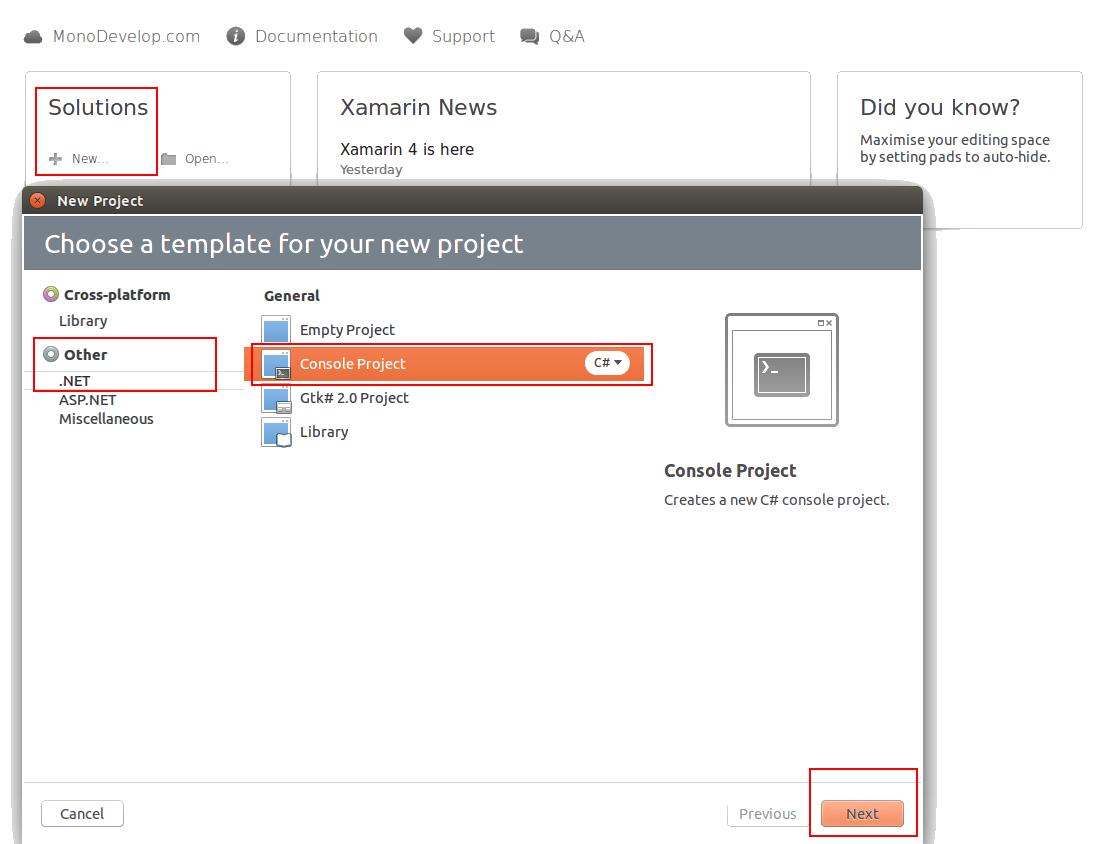
To create a simple project when IDE is up

  • Click on create New project under Solutions section
  • When new from will open select .NET under Other section
  • Then select Console Project and click Next

step-1


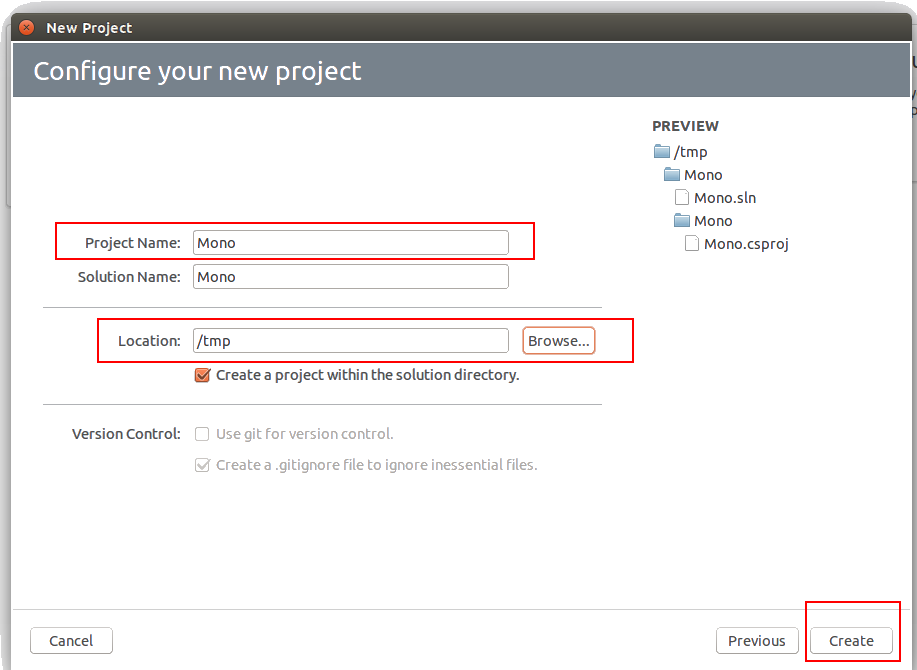
  • In the Configure your new project form name your project
  • Set project location
  • Click Create

step-2


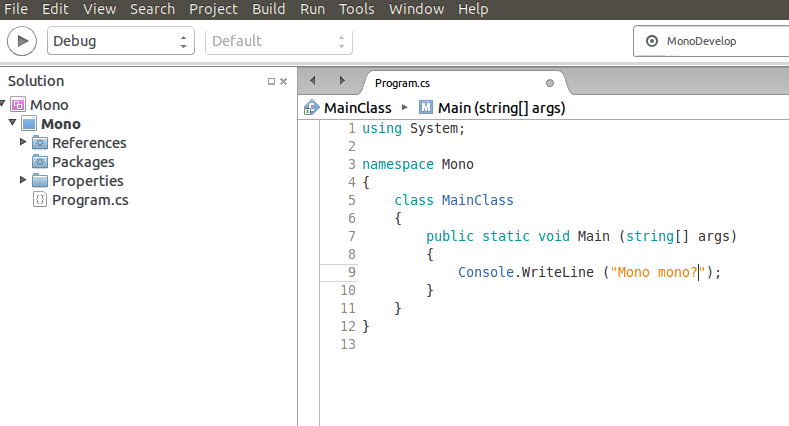
  • That’s it you are all set up

step-3


Wrapping-up

  • Mono is good for you if you feel lonely without C# on Linux
  • Mono is open source and as such contribution is more than valued
  • Mono is great but it seems Stereo must have been even better

Java Code Geeks

Meet ANTLR v4

antlr4

Change brings opportunities

Current post is affected by the fact that I started to work at Checkmarx company that specializes on static code analysis.

As it often happens starting new things brings unexpected opportunities and discoveries. One such discovery for me was ANTLR (ANother Tool for Language Recognition) that was written by professor Terence Parr.

The main purpose of the tool is to generate parsers based on provided grammar or as Terence Parr puts it at the ANTLR site

What is ANTLR?

ANTLR (ANother Tool for Language Recognition) is a powerful parser generator for reading, processing, executing, or translating structured text or binary files. It’s widely used to build languages, tools, and frameworks. From a grammar, ANTLR generates a parser that can build and walk parse trees.

It is fun

From yesterday (12/8/2015) I’ve started to learn working with ANTLR v4 with the help of very detailed and down to earth The Definitive ANTLR 4 Reference book by Terence Parr.

If you’ll consider to read the book then you’d be better off by practicing with OS X or Linux since book’s examples are oriented to those operating systems. As David Ray puts it ‘who does still use Windows machines anyway?’

ANTLR v4 is fun to learn and practice especially if you previously had some experience with Java since the tool is written in Java itself.

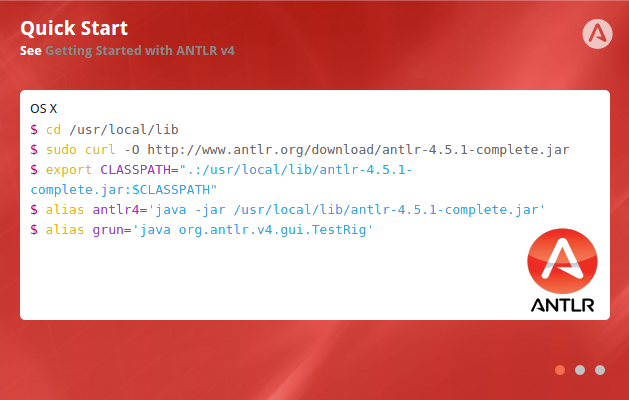
Quick Start

OS X/ Linux (Ubuntu)

$ cd /usr/local/lib
$ sudo curl -O http://www.antlr.org/download/antlr-4.5.1-complete.jar
$ export CLASSPATH=".:/usr/local/lib/antlr-4.5.1-complete.jar:$CLASSPATH"
$ alias antlr4='java -jar /usr/local/lib/antlr-4.5.1-complete.jar'
$ alias grun='java org.antlr.v4.gui.TestRig'

Useful links

There are a couple of links that make you life more interesting and happier since Terence Parr, in my opinion, is not only a very insightful programmer but he’s also very entertaining lecturer.

Well, that’s it. Here come two talks that Terence gave in recent years that are related to parsers and ANTLR.

  1. Video – Why Program by Hand in Five Days what You Can Spend Five Years of Your Life Automating?  – 2011
  2. Video – The Quest for the One True Parser – 2015
  3. Video – ANTLR v4 with Terence Parr – 2013
  4. Book – The Definitive ANTLR 4 Reference – 2013
  5. Book – Language Implementation Patterns – 2009
  6. Thinks of contribution – ANTLR open source at GitHub.

Takeaways

  • Change keeps a surprise for your
  • ANTLR v4 is powerful and fun like never before
  • This post is a first part of a number of posts that I plan on the subject


Java Code Geeks

VS 2015 Installation Instructions

101_BoxShot_2015_07_17T14_17_21

Why not to try Visual Studio Community 2015?

Try to follow these steps for low probability of success installation

  1. Download VS iso file from MS DreamSpark site
  2. Mount the image using instructions from How-To Geek, for instance those ones.
  3. Confirm Default installation.
  4. When you’ll find out that installation will be stuck use Your Uninstaller to get rid of VS 2015.
  5. When you’ll find out that removal process will be stuck (how funny) kill vs_community.exe *32 process in Windows Task Manager.
  6. Finally, remove VS 2015.

Now you have two options left

  1. Reinstall VS Community 2015 with Repair option and pray it will work this time.
  2. Switch to Java on IntelliJEclipse on Ubuntu (or Windows).


Java Code Geeks