In the age of GenAI tools dominance it is easy to use these tools blindly, without thinking how the tools come up with their answers.
The main issue with treating these tools as a black box is the fact that people learn by making mistakes, while they apply what they try to learn. The problem with GenAI tools is that they give you a complete answer without you exerting any effort in trying to solve the problem on your own. Hence, you miss a critical step in a learning process, which is without a challenge there is no gain.
I can say this based on my own experience with using GenAI tools at work and at home for dozens if not hundreds times a day. The main issue with using GenAI tools at work, such as M365 Copilot Chat and the like, for software development tasks, is what I’ve mentioned above. These tools may give you a complete implementation that works, but you don’t learn anything new as a result, since you don’t try to implement that same thing on your own.
A good example, can be a situation where you’d like to have a Python script that can transform data from one format into another. Recently, I needed to transform an OWASP Dependency Check plugin JSON report into a more user friendly format, specifically into a CSV file (aka Excel) to be able to see security vulnerabilities at a glance and to be able to sort them by the NVD last updated date.
To write such a script in Python would take me some time for sure. For I need to understand how to parse JSON file, extract various fields and then write the data in to CSV file. I had a bright idea to use GenAI to do it quickly to save time and effort. Indeed, after a few back and forth iterations with M365 Copilot Chat I had a working Python script that delivered what I needed, without me even looking into the implementation. It was what I’ve mentioned a black box treatment of the GenAI response. It worked and I didn’t care how. But, the main point was, that I didn’t learn anything in the process and felt actually as I was cheating.
I needed to update the script in the end, so I did indeed look at the implementation. And it took me some time to figure out how it worked. It was written well and in a modular fashion. But, I think I’d never do it in a similar way as a GenAI model did. I was able to understand and adapt the code enough for it to work, but it didn’t work quite well. So, I said to myself, well it’s time to save my effort and asked GenAI to refactor it, which it did correctly first time.
So, in the end, I did save time on that script, and I did learn how it worked, since I was curious, but I didn’t get the same amount of experience, should I implement it on my own from start to finish.
In this case, I am not talking about GitHub Copilot, for I don’t use it currently. But, even using free GenAI tools can be harmful in the long run, if you treat them as black boxes, instead of tools that help you think better. They cannot substitute thinking, for then you become dumber in the process.
Also, with recent improvements in Anthropic Claude agents, people such as Andrej Karpathy state that we are in the new era of software programming. It sounds that it’s a valid statement to make, since he’s not the only one noticing this change in performance of GenAI agents, but the crucial point is that people who didn’t have software programming experience before starting to use such tools will certainly have a gap in programming skills, for they didn’t face challenges that taught them how to really think. Karpathy is a good example, since he was a programmer before GenAI tools where on the horizon.
In the end, GenAI tools can be very helpful and effective in helping you learn whatever topic you want, but they can be as effective in preventing you from gaining valuable experience while you master the subject.
I think there’s hardly a person left who didn’t hear about 3I/ATLAS. Third interstellar object that has visited us and is currently moving through Solar System on its way towards Jupiter Hill radius.
This interstellar object is unlike any comet known to us so far. With its anomalies, that some of them have not been explained, it sparks imagination of observers. For it could be an artificial object visiting us from afar.
I am interested in astronomy, space exploration in general and Solar System exploration in particular. So, I tend to follow what’s new in this area. As soon as I heard about 3I/ATLAS I knew I needed to check what Avi Loeb had to say on the subject, for I knew he had provided an interesting hypothesis about Oumuamua being a light sail object of a potential artificial origin.
Lo and behold, back in the summer of 2025 Avi wrote a paper where he mentioned that 3I/ATALS could be a spacecraft that could release probes, but most importantly, he mentioned Dark Forest theory. I was curious what that dark forest was about and this way I found out about The Dark Forest book in the Remembrance of Earth’s Past trilogy written by Chinese science fiction writer Liu Cixin.
I ordered the first book in a series on September 9th, 2025. It turned out that the book was very interesting to say the least. I think the trilogy is the best hard science fiction that I ever read. Maybe, I didn’t read a lot of sci-fi.
I forgot to mentioned that before reading the book I started to watch Netflix series that was based on the trilogy. I liked first few episodes a lot. But the book is much more better, and they changed almost everything in the series, which I found dubious. There is a Chinese movie adaptation of The Three-Body problem book which is quite faithful to the book content, but that series is a little bit boring because of this.
Well, having finished reading the trilogy I was curious whether other books of Liu Cixin were that good and bought Ball Lightning on Sep 29th, 2025. That book was interesting, but underwhelming in comparison to The Three-Bod Problem. I should mentioned that the book was written before the trilogy, though. Recently, he hasn’t written new sci-fi novels that could compare to the trilogy. I watched a couple of interviews with Liu Cixin and he mentioned that it’s difficult to write something significant after the trilogy.
The hard sci-fi books above were very influential, so I used Copilot Chat to search for similar books. In the end, I found Revelation Space series by Alastair Reynolds and on Oct 28th, 2025 I got Revelation Space book. This series was quite different in comparison to Three-Body Problem, but still it was very captivating reading. I ended up reading all the books in the series including the recent forth one Inhibitor Phase that I got on Dec 10th, 2025. I read a number of his other books since then.
Next, I figured out that buying books was quite expensive and discovered that borrowing books from a local library was free and it had most of the books by Alastair Reynolds and other sci-fi authors.
So, after reading 11 books by Reynolds, which I will list later in the post, I thought I needed to find something similar again. Watching a YouTuber that talks about sci-fi books he reads I found out about Spin by Robert Charles Wilson. I, actually, bought that book on Jan 1st, 2026, since library didn’t have it. I liked that book a lot. It is different in many ways in comparison to Three-Body Problem and books by Reynolds. It has a number of very interesting hard sci-fi ideas which you can discover by reading the book.
Then I checked what other books he wrote, and as a consequence read his The Chronoliths novel, which I borrowed in January 2025 from the library.
Well, what should I read next? I re-watched recently Contact movie which was based on the Contact novel by Carl Sagan. Well, I needed to read it too. So, I borrowed it from the library and finished recently.
Now, in February 2026 I am reading The Revelation Space Collection Volume 1 and 2, which is a collection of sci-fi stories happening in the Revelation Space Universe that Alastair Reynolds written throughout the years starting from 1990 and until 2021.
I also ordered Ring by Stephen Baxter on Feb 7th, 2026 and I have a book of stories by Ted Chiang Exhalation and a novel Children of Time by Adrian Tchaikovsky on hold in the library.
Statistics
To summarize from Sep 9th 2025 until February 8th, 2026 which is a period of five months I’ve read 18 books.
Each book on average had 500 pages which makes it 18 * 500 = 9,000 pages. Or 9000 / 5 = 1800 pages a month, or 60 pages a day:
The Three-Body Problem
The Dark Forest
Death’s End
Ball Lightning
Revelation Space
Redemption Ark
Absolution Gap
Inhibitor Phase
Chasm City
Aurora Rising
Elysium Fire
Machine Vendetta
House of Suns
Pushing Ice
Eversion
Spin
The Chronoliths
Contact
What’s next?
As, I’ve mentioned I am reading The Revelation Space Collection Volume 1 and 2, and next Ring by Stephen Baxter, Children of Time by Adrian Tchaikovsky.
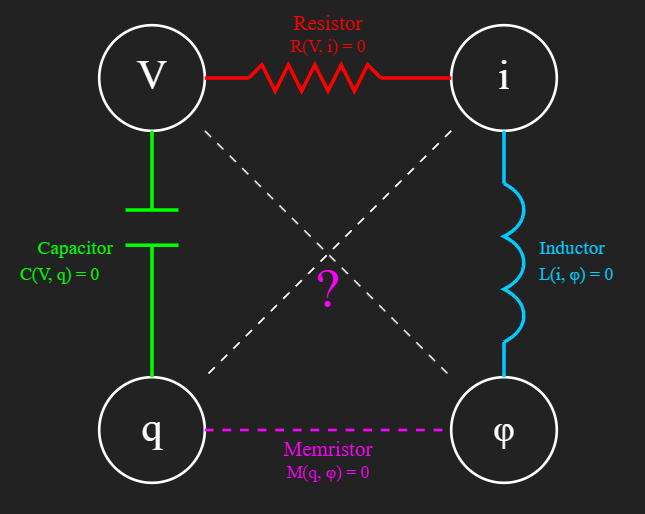
As it sometime happens to me while I was checking what’s new on YouTube the suggestions algorithm had a video about Memristorwhich was a forth basic electrical element that had a memory in it. While I was watching that interesting video that was created by prof. Giordano Scarciotti I saw the symmetry diagram that prof. Leon Chua came up with back in 1971. In that paper he proposed Memristor as a missing fundamental component in electrical circuit theory. So, what’s interesting about that diagram that it very much resembles diagrams in Category Theory.
Next, I’ve used Windows Copilot to elaborate on that idea. Chatting with it back and forth resulted in the blog post below:
Introduction
When we first learn electronics, we’re introduced to three fundamental passive elements: the resistor, the capacitor, and the inductor. Each one ties together two physical quantities:
Resistor: relates voltage V and current i.
Capacitor: relates voltage V and charge q.
Inductor: relates current i and magnetic flux φ.
But in 1971, Leon Chua predicted a missing fourth element — the memristor — which connects charge q and flux φ. This completed the symmetry among the four fundamental electrical quantities.
🔎 Constitutive Relations and the “=0” Notation
In advanced circuit theory, each element is defined by a constitutive relation: a constraint between two variables. Instead of writing explicit formulas like Ohm’s Law (V = R·i), theorists often use an implicit form:
Resistor: R(V, i) = 0
Capacitor: C(V, q) = 0
Inductor: L(i, φ) = 0
Memristor: M(q, φ) = 0
This doesn’t mean resistance is zero. It means: the pair of variables must satisfy some relation enforced by the element. For a linear resistor, that relation is V − R·i = 0. For nonlinear devices, the relation could be more complex. The implicit form is powerful because it generalizes to nonlinear, time-varying, and memory-dependent behaviors.
🔄 Symmetry and Completeness
Chua’s insight was that with four fundamental quantities (V, i, q, φ), there should be six possible pairings. Three were already realized by resistor, capacitor, and inductor. The missing link — charge to flux — was filled by the memristor. This symmetry is what makes the framework elegant: every pair of quantities is connected by a constitutive relation.
🧩 A Category-Theoretic Perspective
Here’s where the categorical flavor comes in. The symmetry looks a lot like category theory:
Objects: The four quantities (V, i, q, φ).
Morphisms: The four elements (resistor, capacitor, inductor, memristor).
Composition: Just as morphisms compose in category theory, circuit elements combine to form networks.
Commutativity: The square diagram commutes: L ∘ R = M ∘ C meaning that whether voltage is mapped to flux via current (resistor → inductor) or via charge (capacitor → memristor), the structural mapping is consistent.
🖼️ ASCII Diagrams
Fundamental Square of Relations
   V ──R──▶ i
   │        │
   C        L
   │        │
   ▼        ▼
   q ──M──▶ φ
R : V → i (Resistor)
C : V → q (Capacitor)
L : i → φ (Inductor)
M : q → φ (Memristor)
Commutative Diagram
        V
       / \
      R   C
     /     \
    i       q
     \     /
      L   M
       \ /
        φ
Here, the two paths from V to φ are equivalent: L ∘ R = M ∘ C
✨ Why This Matters
Thinking categorically opens new doors:
Circuits can be modeled as categories of physical quantities.
Functorial translations could connect circuit categories to computational categories (logic, automata).
Neuromorphic computing, where memristors play a central role, might benefit from categorical semantics.
The memristor isn’t just a missing device — it’s the morphism that makes the diagram commute, completing the symmetry both physically and mathematically.
🧠 The Main Idea
By reframing Chua’s symmetry in categorical terms, we see circuits not just as physical devices but as mathematical structures. The memristor completes not only the physics of passive elements but also the mathematics of a commutative square.
This perspective — born from blending electronics with category theory — is a fresh, original way of thinking about circuit theory. It shows how abstract mathematics can illuminate engineering, and how symmetry drives discovery.
If you have some basic background in programming, or even if you don’t, but want to get some then you can turn to chatbots and in particular to Windows Copilot (I’ll refer to it as Copilot for shortness). You can use Gemini, ChatGPT, Claude etc. if you prefer, and they’ll be as useful. This is what I did just recently when I stumbled upon a post by Dave Plummer at X, where he talked about the need for programmers to understand how compilers produced their output, hence the need to know assembly language. By the way, Dave Plummer developed Windows Task Manager when he was a programmer with Microsoft . He has a YouTube channel where he posts interesting videos related to programming.
Why chatbots can be helpful in this case? First, if you didn’t program in assembly before it can be difficult to approach it. Second, chatbots are very helpful in explaining existing code in any programming language they had in their training data. And, I guess, it means it should know details about most modern programing languages.
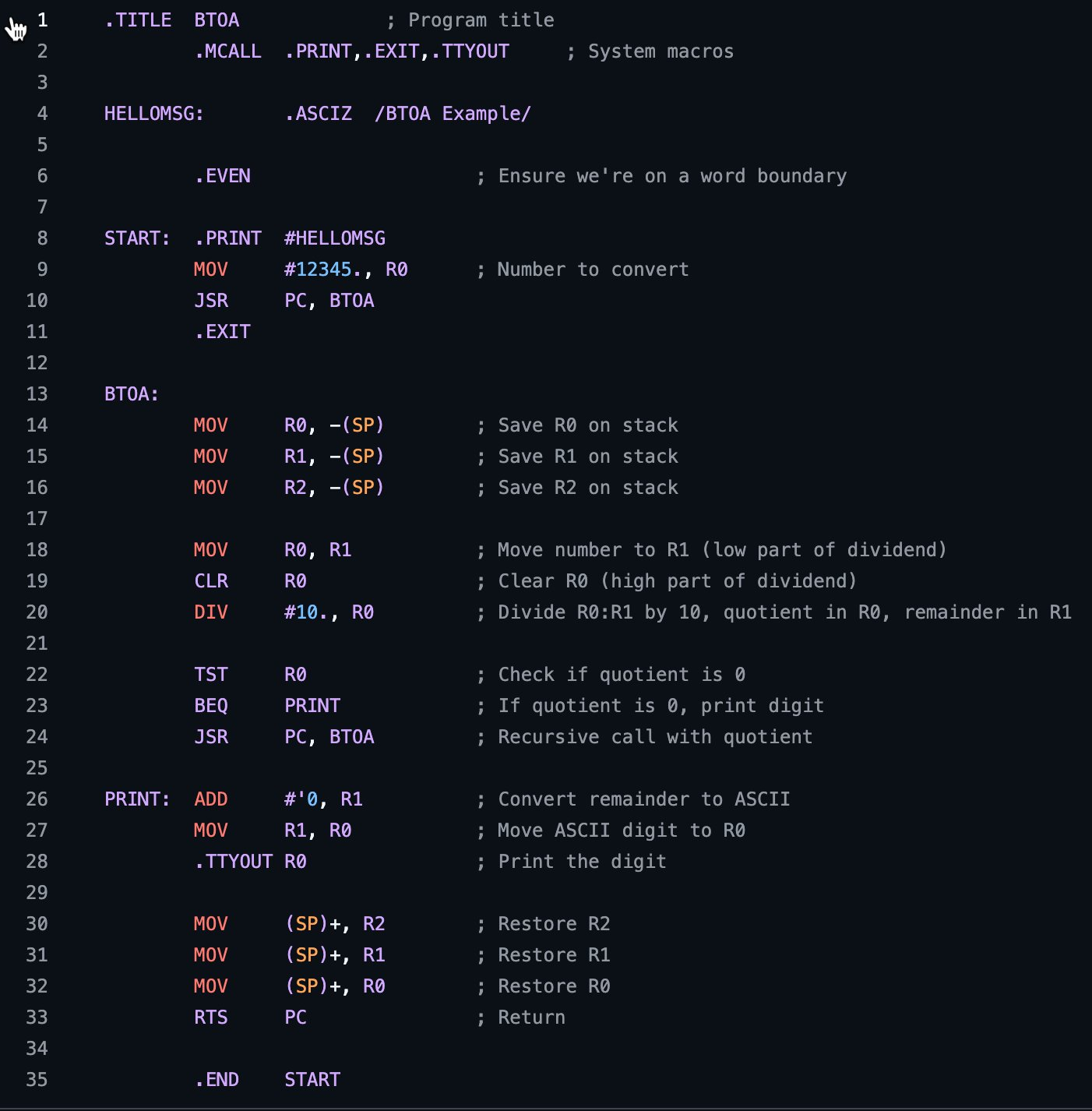
Well, next I’ll provide a screenshot of that post, then I’ll show you that chatbot can transcribe the code from an image alone and explain what we are looking at there. The short summary is that post was about binary to ASCII (BTOA) conversion program written in PDP-11 computer assembly. By the way, all these details where extracted by Copilot from the code in the image. Then, I’ve used Copilot to explain to me in detail how the code works to get full understanding of it.
Pay attention, that I use line separator to mark when the response from chatbot has finished.
Original post
I suppose there's a whole class of programmers for whom a compiler is akin to magic, but knowing what's getting emitted and how it works is fundamental to your success over the long haul.
I suppose there’s a whole class of programmers for whom a compiler is akin to magic, but knowing what’s getting emitted and how it works is fundamental to your success over the long haul. Write some assembly. Read the Dragon book on an airplane. AI will still be here when you get back. In five years, anyone capable of structured thought will be able to become a prompt engineer, but only 1% of software developers will actually be able to debug the stuff that comes out the other end. Be the 1%
What did I do next?
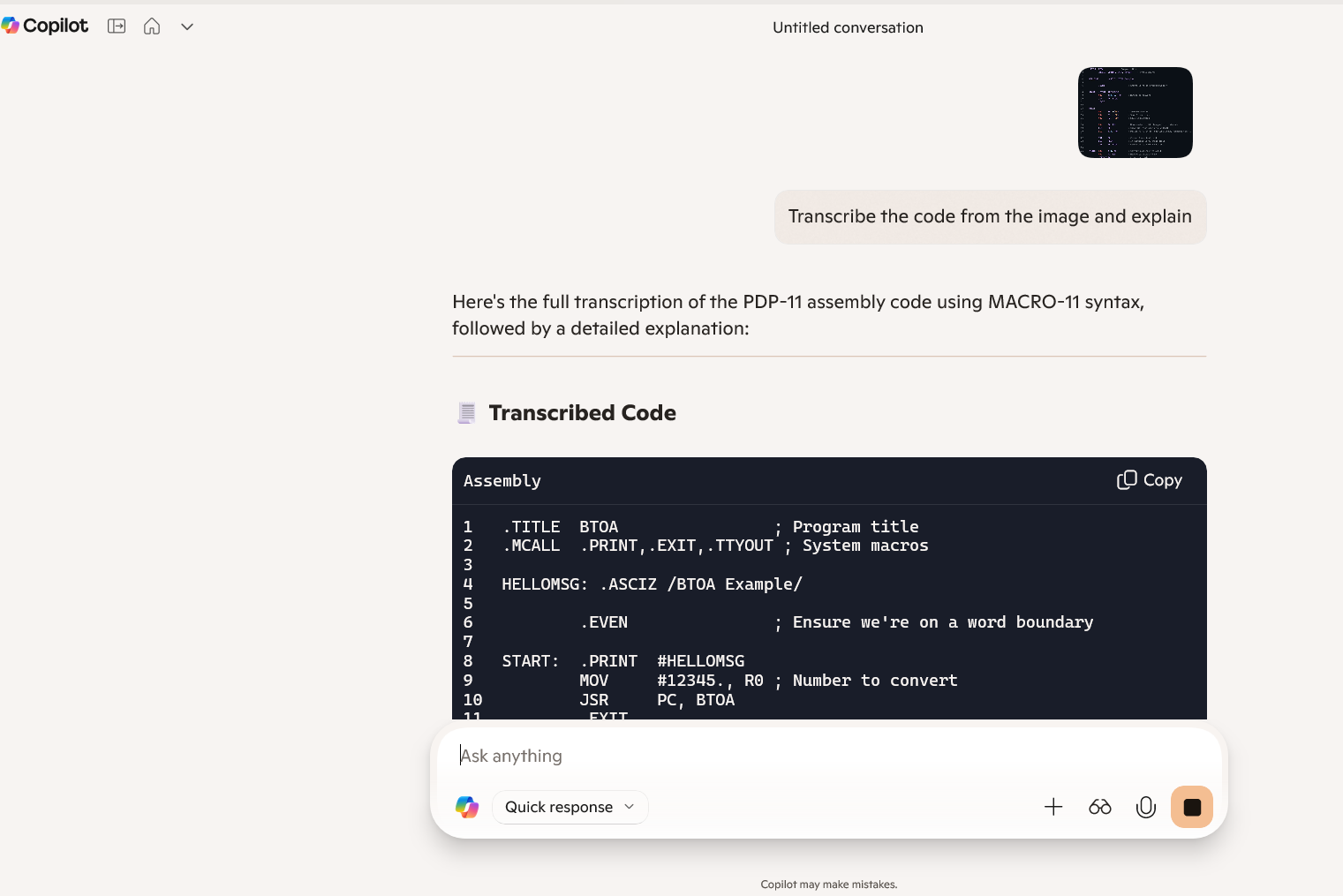
As I’ve mentioned I’ve copy and pasted the image in Copilot and asked it to transcribe the code from the image and explain what it’s doing.
Prompt: Transcribe the code from the image and explain (an image was attached as can be seen in the screenshot below). Response:
Below comes a full response.
Here’s the full transcription of the PDP-11 assembly code using MACRO-11 syntax, followed by a detailed explanation: Transcribed Code
.TITLE  BTOA                ; Program title
.MCALL  .PRINT,.EXIT,.TTYOUT ; System macros

HELLOMSG: .ASCIZ /BTOA Example/

        .EVEN               ; Ensure we're on a word boundary

START:  .PRINT  #HELLOMSG
        MOV     #12345., R0 ; Number to convert
        JSR     PC, BTOA
        .EXIT

BTOA:
        MOV     R0, -(SP)   ; Save R0 on stack
        MOV     R1, -(SP)   ; Save R1 on stack
        MOV     R2, -(SP)   ; Save R2 on stack

        MOV     R0, R1      ; Move number to R1 (low part of dividend)
        CLR     R0          ; Clear R0 (high part of dividend)
        DIV     #10., R0    ; Divide R0:R1 by 10, quotient in R0, remainder in R1

        TST     R0          ; Check if quotient is 0
        BEQ     PRINT       ; If quotient is 0, print digit
        JSR     PC, BTOA    ; Recursive call with quotient

PRINT:  ADD     #'0, R1     ; Convert remainder to ASCII
        MOV     R1, R0      ; Move ASCII digit to R0
        .TTYOUT R0          ; Print the digit

        MOV     (SP)+, R2   ; Restore R2
        MOV     (SP)+, R1   ; Restore R1
        MOV     (SP)+, R0   ; Restore R0
        RTS     PC          ; Return

.END    START
🧠 Explanation
This program converts a binary number (in this case, 12345) to its ASCII decimal representation and prints it to the terminal.
🔹 Header and Setup
.TITLE BTOA: Sets the title of the program.
.MCALL .PRINT,.EXIT,.TTYOUT: Declares macros for printing, exiting, and terminal output.
HELLOMSG: .ASCIZ /BTOA Example/: Defines a null-terminated string.
.EVEN: Ensures the next instruction is aligned on a word boundary.
🔹 Main Routine (START)
.PRINT #HELLOMSG: Prints the greeting message.
MOV #12345., R0: Loads the number 12345 into register R0.
JSR PC, BTOA: Calls the BTOA subroutine to convert and print the number.
.EXIT: Ends the program.
🔹 Subroutine (BTOA)
Saves registers R0, R1, and R2 to the stack.
Sets up for division: moves the number to R1, clears R0 to form a 32-bit dividend.
DIV #10., R0: Divides R0:R1 by 10. Quotient goes to R0, remainder to R1.
TST R0: Tests if quotient is zero.
If yes, go to PRINT.
If not, recursively call BTOA with the quotient.
PRINT: Converts the remainder (digit) to ASCII by adding '0', then outputs it using .TTYOUT.
Restores registers from the stack and returns.
This recursive approach ensures digits are printed in the correct order (most significant to least significant). Would you like to see how this would look in C or another language for comparison?
Let’s try to understand how it works in more detail.
Question: First of all, what is BTOA?
Response:
Great question! 🧠
BTOA stands for Binary To ASCII. It’s a common abbreviation used in programming to describe the process of converting a binary (or numeric) value into its ASCII character representation, typically for display or output purposes.
🔍 What does “Binary to ASCII” mean?
Binary: In this context, it refers to a numeric value stored in binary format (e.g., the number 12345 in machine-readable form).
ASCII: The American Standard Code for Information Interchange — a character encoding standard that maps numbers to printable characters like '0' to '9', 'A' to 'Z', etc.
Okay, now that we know what that mysterious BTOA was how about we understand what happens inside this block of code that resides inside the BTOA function?
        MOV     R0, R1      ; Move number to R1 (low part of dividend)
        CLR     R0          ; Clear R0 (high part of dividend)
        DIV     #10., R0    ; Divide R0:R1 by 10, quotient in R0, remainder in R1

        TST     R0          ; Check if quotient is 0
        BEQ     PRINT       ; If quotient is 0, print digit
        JSR     PC, BTOA    ; Recursive call with quotient
Also, before jumping to Copilot for help we can see assembly language program that is doing some computation using registers in CPU such as R0 and R1. We can see the data is moved, cleared, a division is done and then there is a conditional logic on lines 5, 6 and 7. In the screenshot it corresponds to lines 22, 23 and 24.
So what is the explanation ? Response:
This block of PDP-11 assembly code is the core of the binary-to-ASCII conversion logic. It performs division by 10 to extract digits from a number and uses recursion to print them in the correct order. Here’s a breakdown of each line:
🔍 Line-by-Line Explanation
18 MOV R0, R1 ; Move number to R1 (low part of dividend)
Copies the number from R0 to R1.
This sets up the 32-bit dividend for division: R0:R1 (high:low).
19 CLR R0 ; Clear R0 (high part of dividend)
Clears R0 to zero.
Now the full dividend is 0:R1, effectively treating the original number as a 32-bit value with high word = 0.
20 DIV #10., R0 ; Divide R0:R1 by 10, quotient in R0, remainder in R1
Performs a 32-bit division of R0:R1 by 10.
After this:
R0 contains the quotient (i.e., number / 10)
R1 contains the remainder (i.e., number % 10), which is the rightmost digit
22 TST R0 ; Check if quotient is 0
Tests if the quotient is zero.
This determines whether there are more digits to process.
23 BEQ PRINT ; If quotient is 0, print digit
If R0 is zero, it means this is the last digit.
Branches to PRINT to output the digit.
24 JSR PC, BTOA ; Recursive call with quotient
If R0 is not zero, it means there are more digits.
Recursively calls BTOA with the quotient in R0, continuing the process.
🧠 Summary
This block:
Extracts the least significant digit of the number.
Uses division and recursion to process digits from most significant to least significant.
Ensures digits are printed in the correct order by printing only after recursion unwinds.
Conclusion
Well, I guess it clarifies a bit what the code is doing. And you probably got a point of how you can use a chatbot to help you understand a piece of code in a programming language you probably never saw and drill down to nitty gritty details of the implementation and really understand how it works.
Have you wondered how it is possible to develop imagination in general and creative imagination in particular. After all, it seems like the state of the things is that some people have it and others don’t. But don’t be so fast to think so. It turns out that it is possible to train your imagination in a similar way as how you can gain muscles by exercising in a structured way.
To save you time and effort imaging such a structured and systematic approach to developing creative imagination you can turn to a method that was developed by Genrikh Altshuller the creator of the Theory Of Inventive Problem Solving also known in its Russian acronym form as TRIZ.
One constituent part of TRIZ is Development of Creative Imagination. It consists of a number of methods and imaginative techniques (operators) that can help you develop creative imagination in engaging and joyful manner.
In this post I’d like to mention some of the techniques or imaginative operators that can be helpful in developing creative imagination. These operators were introduced by sci-fi writer Pavel Amnuel.
A complete list of operators comes below. I call them operators in the mathematical sense, since they act on an object, idea etc. and transform them in one way or the other. As you may notice, first operator in the list is Inverse.
Do the “opposite” – Inversion. (The following methods form pairs in which one element is the opposite of the other—i.e., using the “do the opposite” operator or duality.)
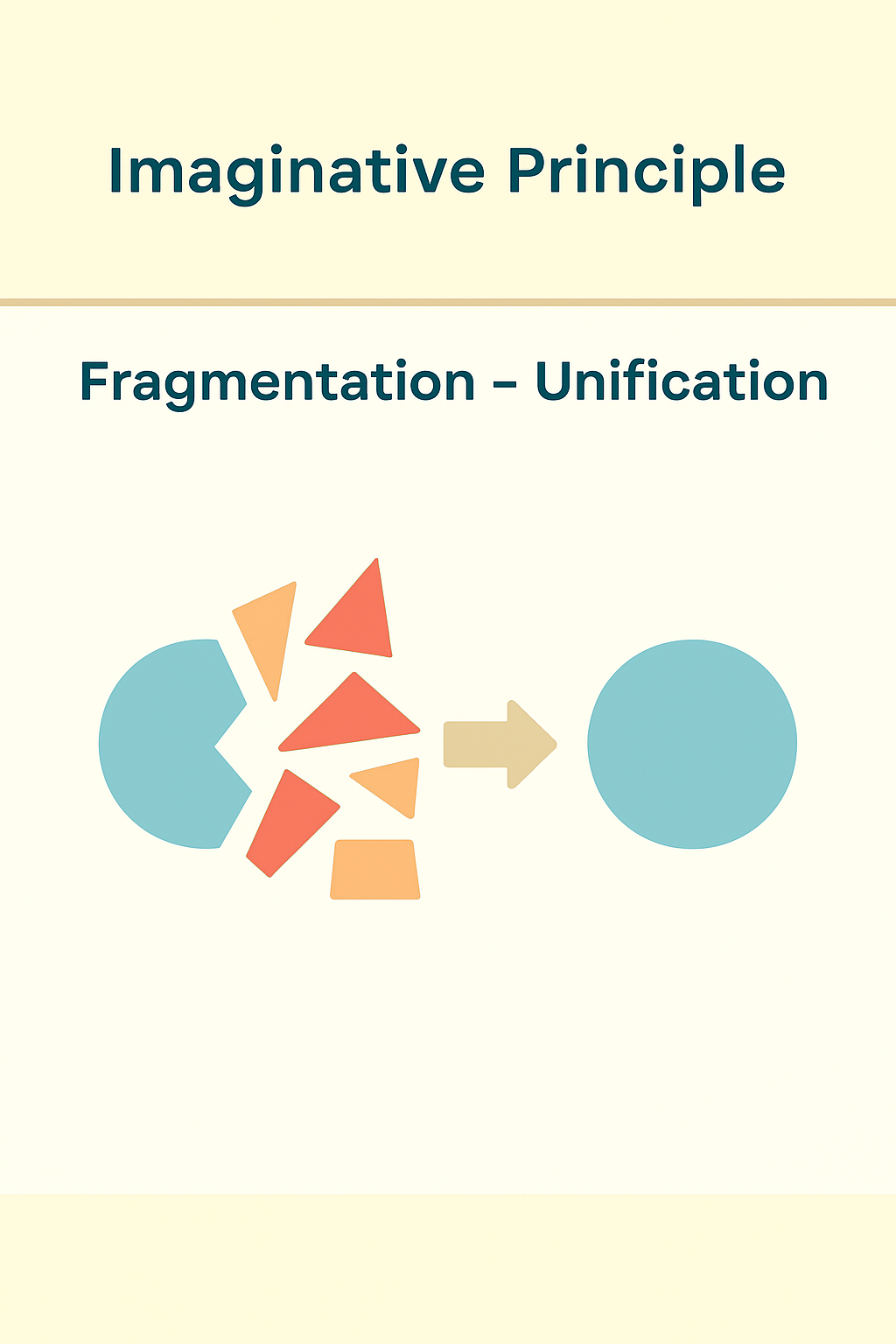
Segmentation – Unification (for a property or object)
Make Dynamic – Static
Turn Artificial – Natural
A method to change immutable things (Change what is usually considered unchangeable).
Next, I’ll provide visual examples of each operator by referencing sci-fi movies that incorporated them.
Examples of the operators in sci-fi movies
Supersize me
The movies below are an example of Increase – Decrease operator where kids were shrunk and then a kid was enlarged. And what’s funny going from an idea of one movie to the other involved simply using an Inversion operator.
Most probably first literary reference of this operator in fiction was: Gulliver’s Travels by Jonathan Swift (1726)
Honey, I Shrunk the Kids (1989),
Honey, I Blew Up the Kid (1992)
Superman
The movie below is an example of Acceleration and Addition operators when a number of regular human abilities were increased and placed in a single person.
Superman movie from 1978.
Superman was originally created by DC Comics (1938).
Superman’s famous arsenal of powers has included flight, super-strength, super-speed, vision powers (including x-ray, heat-emitting, telescopic, infra-red, and microscopic vision), super-hearing, and super-breath.
Intelligence Enhancement
The movie below is an example of Addition – Removaloperator when super-intelligence was added to a person that didn’t have it originally.
The Lawnmower Man (1992).
A short story Flowers for Algernon by Daniel Keyes (1959) is based on a similar idea.
The Invisible Man
The image below is an example of the Insertion – Extraction operator where a property of being visible was extracted from a body of a person.
Book: The Invisible Man by H.G. Wells (1897)
Time Travel
The movie below is an example of the Inversion and Discrete – Continuous operator when a continuous time made discrete and traversable back and forth.
Film: Back to the Future (1985)
The idea originally came from the book: The Time Machine by H.G. Wells (1895)
Anti-gravity
The idea below is based on the Method to change immutable things (Change what is usually considered unchangeable).
The concept was first introduced formally as “Cavorite” in H. G. Wells’ The First Men in the Moon (1901).
Capitan’s Log
The idea below is based on the Segmentation-Unification operator when an object is segmented into atoms and then assembled into a whole again.
Teleportation is the transfer of matter from one point to another, more or less instantaneously.
The word “teleportation” was coined in 1939 by American writer Charles Fort to describe the strange disappearances and appearances of anomalies, which he suggested may be connected.
In this post I’d like to provide a short example of how chatbots, in particular Windows Copilot, can help you address issues related to web browsing, programming, reverse engineering, intelligent internet searching (aka semantic searching) etc.
The issue
In this case I wanted to check what sci-fi writer Pavel Amnuel had on his website. Even though that website looks dated and it is, the information it contains is still relevant to this day. There you can find his essays on hard science fiction, a “A Course of Lectures on TRIZ and the Development of Creative Imagination (PTB)” and more.
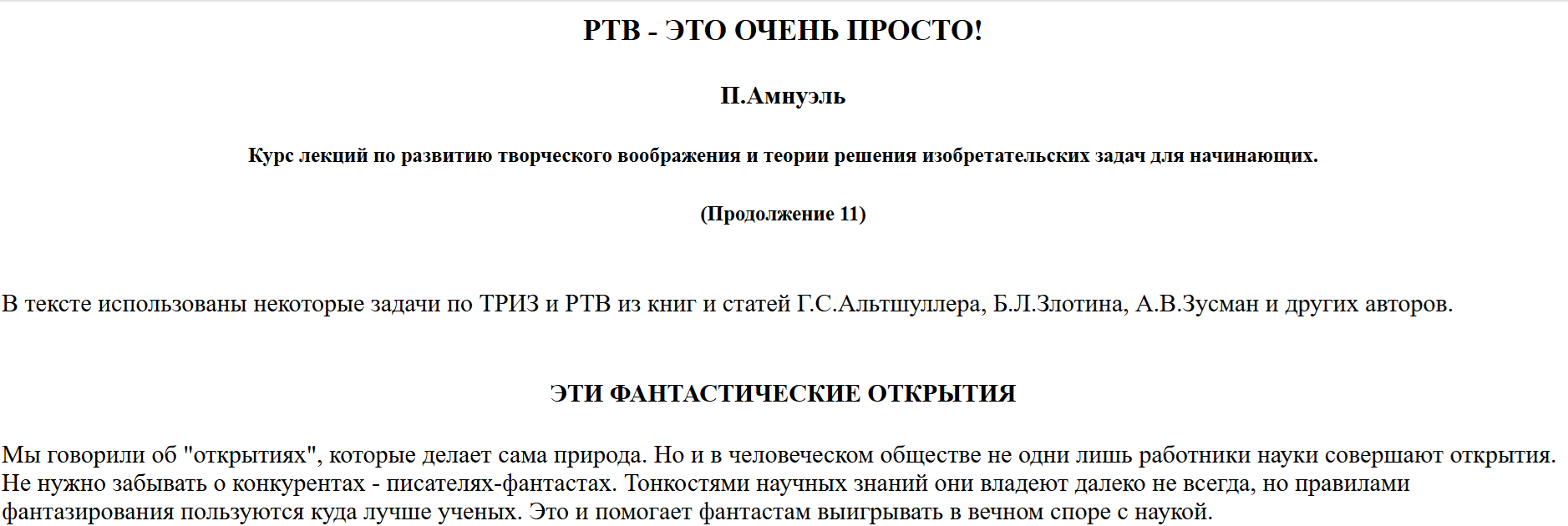
That course on Development of Creative Imagination consists of thirteen parts, and it turns out that the 11th one has incorrect encoding and looks like this at the time of writing
So, what I did I’ve posted a part of it in Windows Copilot and asked about the encoding issue. It came up with a correct explanation right away.
prompt: fix encoding of this text …
response: The text you’ve provided appears to be Cyrillic text misinterpreted as Latin characters due to incorrect character encoding. Most likely, it was originally written in Russian using Windows-1251 encoding, but then read or displayed using Windows-1252 (Latin-1) or UTF-8 without proper conversion.
🔍 Correct Encoding: Windows-1251 (Cyrillic)
When decoded properly, the text reads as: РТВ — ЭТО ОЧЕНЬ ПРОСТО! Г. Альтшуллер Курс лекций по развитию творческого воображения и теории решения изобретательских задач для начинающих. (Proverb 11)
В тексте есть некоторые задачи по ТРИЗ из РТВ, из книг и статей Г.С. Альтшуллера, Б.Л. Злотина, А.В.В. Асмана и других авторов.
🛠 How to fix encoding issues
If you encounter similar garbled text:
Identify the original encoding — in this case, Windows-1251.
Use a text editor or converter that allows you to change encoding (e.g., Notepad++, Sublime Text, iconv).
Convert from Windows-1251 to UTF-8 to make it readable across modern systems.
Would you like me to help you convert a file or more text like this?
I’ve tried a couple of approaches, again, using Copilot’s assistance. In the end what I’ve ended up doing is saving the page as html file and updating the headelement with the following meta tag below which provided correct Cyrillic encoding instead of the Latin one.
<meta charset=”windows-1251″>
This is how the properly encoded version looks like
I’ve also notified the author about this issue, and hopefully, by the time you are reading this post it will be fixed already.
Bonus
One more thing, if you’ve noticed the link to Pavel Amnuel’s website opens that page in English. This is no coincidence. The page is originally in Russian, but Copilot helped me to discover that Google Translate allows to translate a web page into a specific language and get a link to that translated page. How neat is that?
prompt: I mean I need a link that I can share after it was translated response: Ah, got it! You want a sharable link to the translated version of the page. Here’s how to do that using Google Translate:
Can be shared with anyone — they’ll see the English version of the Russian page
Translates the page from Russian (sl=ru) to English (hl=en)
Automatically opens the translated version in Google Translate
By the way, while on that website you can right click on the mouse button and translate any of the articles into English. Nowadays, translations are of a very high quality. Also, I saw that when you navigate to a translated page link, other linked pages are translated automatically!
Summary
Here you have it Windows Copilot or any other similar tool can do wonders if you ask it to help.
In this post I’d like to share useful information on how to use LLMs and in particular Windows Copilot powered by GPT-4o (most probably) and GPT-5 models to assist in reverse engineering electronic boards.
So far, I was able to use these models to successfully reverse engineer software projects at work. And over the weekend I was able to apply Windows Copilot to help me reverse engineer a Switched-Mode Power Supply (SMPS) Board from a cheap DVD player I bought a couple of years ago.
The background for this hardware reverse engineering effort was that I bought a DVD player at Amazon to watch a couple of DVDs and listen to CDs I had. I used it a number of times and then didn’t use it for a while. When I tried to power it on a couple of years later it didn’t work. The debugging showed that the capacitor in the SMPS board was leaked. So, I found a similar capacitor (1000 uF, but 10 V max) in one of the old mobile phone charges and replaced it. The DVD started to work again. I’ve documented this process in the YouTube video. The main issue was that I didn’t check what was that capacitor’s maximum voltage. And as I’ve mentioned, it was 10 V. But other capacitors that were filtering the ripple before output were 16 V. I didn’t notice this at the time. So when I tried to use that DVD player later it didn’t start again. I already wanted to throw it into garbage, when I gave it a chance and opened it again. What I saw that the same capacitor that I replaced before leaked too. It turns out there is a need to use a 16 V maximum rated capacitor to account for potential voltage spikes.
This time I was more systematic and started to use Windows Copilot to query for what capacitor I could use in place the leaked one. I had a couple of old mobile phone charges left that I disassembled while looking for a 1000 uF capacitor which I didn’t found in the end. I only had 470 uF ones. But LLM reasonably suggested to use 1000 uF cap, since you can’t replace a capacitor without considering what was its purpose in the circuit. So, I understood that I must follow an advice from the Debugging Rules! book by Dave Agans, first I needed to Understand the System!
Since, I am an electrical engineer by education, I had some background to understand what various components were on the board and what some of them were responsible for. For example, I could see a rectifier bridge (it is used to convert AC current to DC), transformer, resistors, capacitors, chips and more. Which was helpful. If you have no such background, then before attempting a hardware reverse engineering project, you can use LLMs to learn the basics of electronics.
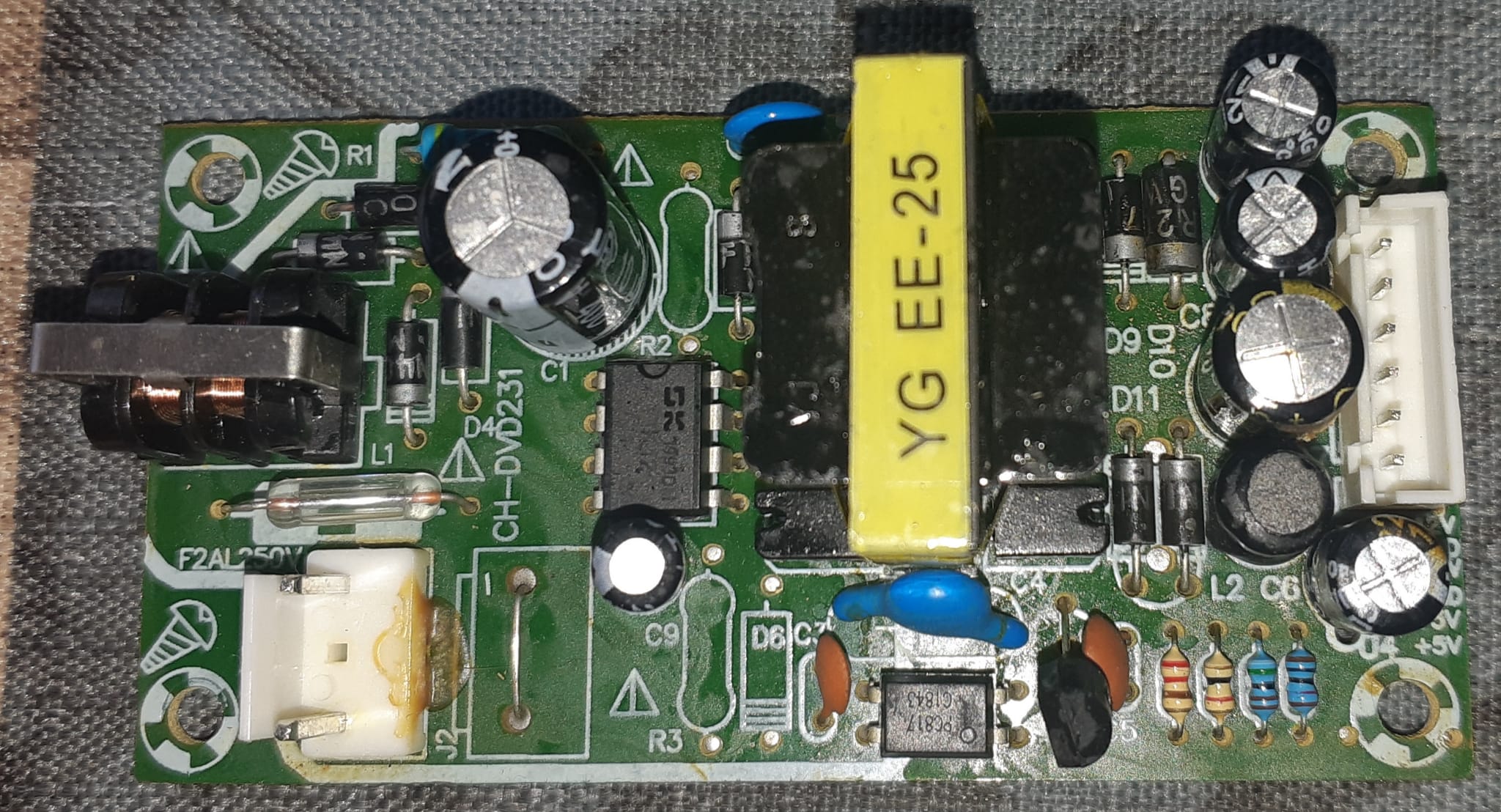
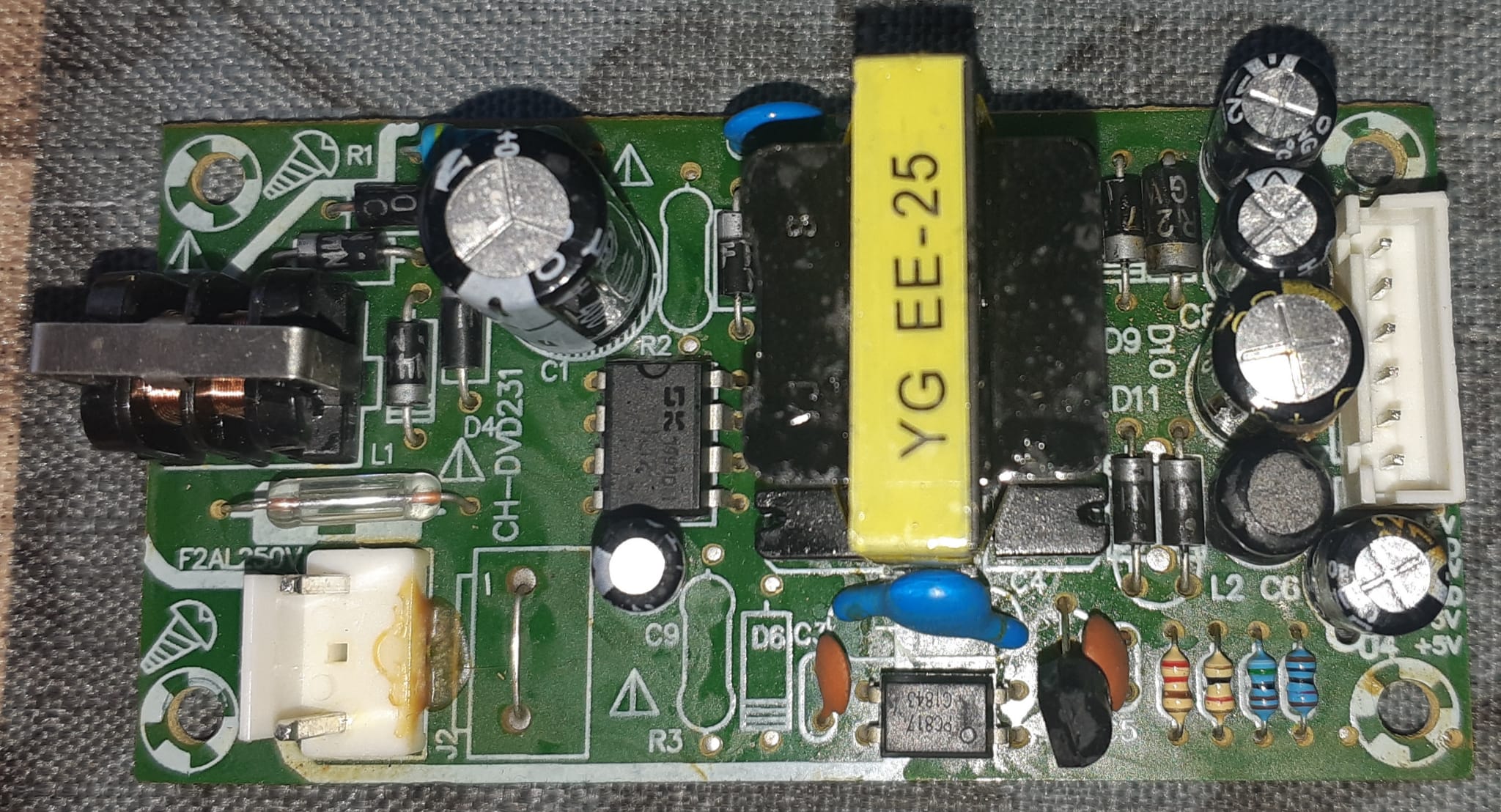
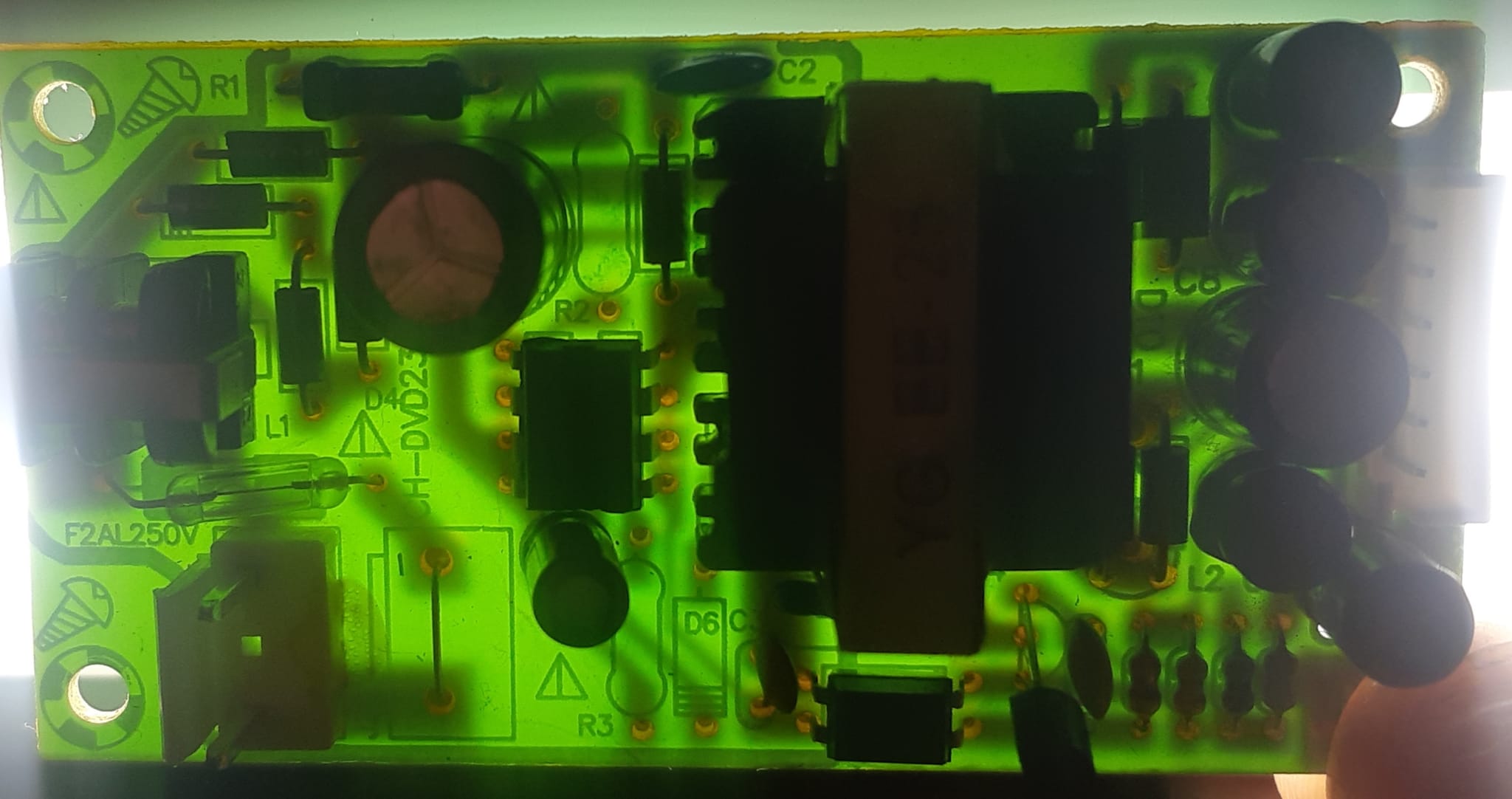
So, the board in question looks like below. First image shows the board from the top, and second image shows the board when it is placed on the lamp and it looks transparent to see the traces (wires) on the back side of it.
So, when you look at the left-hand side part of the left image you can see a white connector which connects to the AC power cord. Then it goes through the fuse just above it and connects to the black choke coils. It in turn connects to a bridge rectifier. Then it goes to a capacitor. After this I didn’t know what the circuit was doing exactly, though I could see a 8 pins Integrated Circuit (IC), a transformer with a yellow tape around it. More diodes, resistors, caps and a white output connector.
What was helpful was that the board had good markings explaining various components. This is a standard engineering practice. For example, R stands for Resistor, L stands for Inductor, C stands for Capacitor, D stands for a Diode, U stands for an Integrated Circuit (chip), Q stands for Transistor, J stands for a Connectors, F stands for Fuse.
I had an idea to upload an image of the board on the left in Windows Copilot and I did just that. GPT was able right away to tell that fuse was there, the transformer was there and it could recognize other parts too. It was also able to understand that it was a Switched-Mode Power Supply of a flyback type. So I started to provide it with information about the capacitor I wanted to replace, in particular that it was connected to the GND output pin. I also provided it with the pinout of the output connector and it was able to infer from it that there were two +5 V pins connected together which was correct.
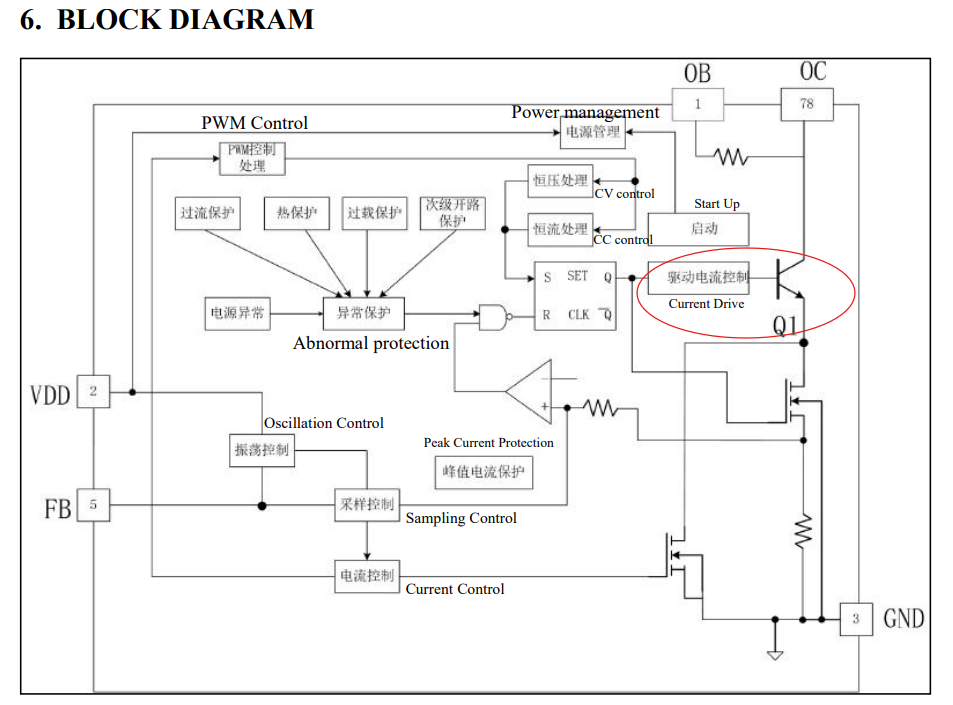
But the most surprising part was that GPT was able to infer that there should have been a feedback loop implemented with optocoupler marked as PC817, which I was able later to identify on the board. Then it was able to infer that the 8 pin chip was most probably Pulse Width Modulation (PWM) controller and that it should have been connected to power transistor. Looking at the specification of that DM1203 chip I was able to confirm that it came with power transistor built-in shown in the diagram for the spec below.
In the end GPT taught me that the output from the PWM controller should be connected to the snubber capacitor
In the end after back end forth with the GPT it was able to provide me with the description of the schematics of the board. Since I don’t have a history of my prompts at this time I tried to recreate in a concise manner my interaction with LLM. In the case below I provided two images and not one, and a detailed description of the board. LLM was able to exhibit very detailed understanding of what were the components on the board and how it worked.
Prompt: I have the Switched Mode Power Supply board with following components PWM controller DM1203, optocoupler PC817, transformer with 12V and 5V output, smoothing capacitors at the output and the following pinout of the connector: -12V, GND, 12V, GND, +5V, +5V. Also attached come two images of the board: one front and one transparent that shows traces on the board. How about you provide me with the description of this board
Response from GPT-5 Board Overview
This is a flyback switched-mode power supply (SMPS) built around the DM1203 PWM controller IC. It takes AC mains input, rectifies and filters it, then uses a transformer to generate isolated DC outputs: +5V, +12V, and –12V. Regulation is achieved through an optocoupler (PC817) and a TL431 reference.
⚡ Input Stage
Fuse (F2AL250V): Protects against overcurrent.
NTC thermistor: Limits inrush current when first powered on.
Bridge rectifier (D9–D12): Converts AC mains to high-voltage DC.
Bulk capacitor (large electrolytic, ~220µF/400V): Smooths the rectified DC.
EMI filter (C1, C2, L1): Reduces conducted noise back into the mains.
Transformer (EE-25 core): Stores energy during switch ON time, releases it to secondary when OFF.
Snubber network: A 10nF/1kV capacitor (103) in series with a 47kΩ resistor across the primary winding — absorbs voltage spikes caused by leakage inductance.
Startup/VCC capacitor: Provides supply to the DM1203 once oscillation begins.
⚙️ Secondary Side (Low Voltage Outputs)
Rectifier diodes: Fast recovery or Schottky diodes on each secondary winding.
Filter capacitors: Large electrolytics (e.g., 470µF/16V) smooth the DC outputs.
Inductors/ferrite beads: Further reduce ripple and noise.
Outputs provided:
+5V (two pins)
+12V
–12V
Ground (two pins)
🔁 Feedback & Regulation
Voltage divider (resistors): Scales the +5V output down to 2.5V.
TL431 shunt regulator: Compares scaled voltage to its 2.5V reference.
PC817 optocoupler: Transfers the error signal across isolation barrier to the DM1203’s FB pin.
FB pin capacitor (1nF–10nF): Stabilizes the feedback loop.
This ensures the +5V rail is tightly regulated, while the ±12V rails are “cross-regulated” (their accuracy depends on transformer design and load balance).
🧠 Functional Summary
AC mains → rectified to ~300V DC.
DM1203 chops this DC at ~65kHz into the transformer.
Transformer provides isolated secondary voltages.
Diodes + capacitors filter into smooth DC rails.
TL431 + PC817 feedback loop keeps +5V stable.
Snubber protects the switch from voltage spikes.
👉 In short: this board is a multi-output flyback SMPS designed for small electronic equipment, giving you isolated +5V, +12V, and –12V rails with the +5V as the regulated “master” output.
Would you like me to redraw this description into a clean block diagram (showing input → primary → transformer → secondary → feedback) so you can visualize the flow more easily?
You can tell that it’s quite amazing what LLM was capable of looking at the description above.
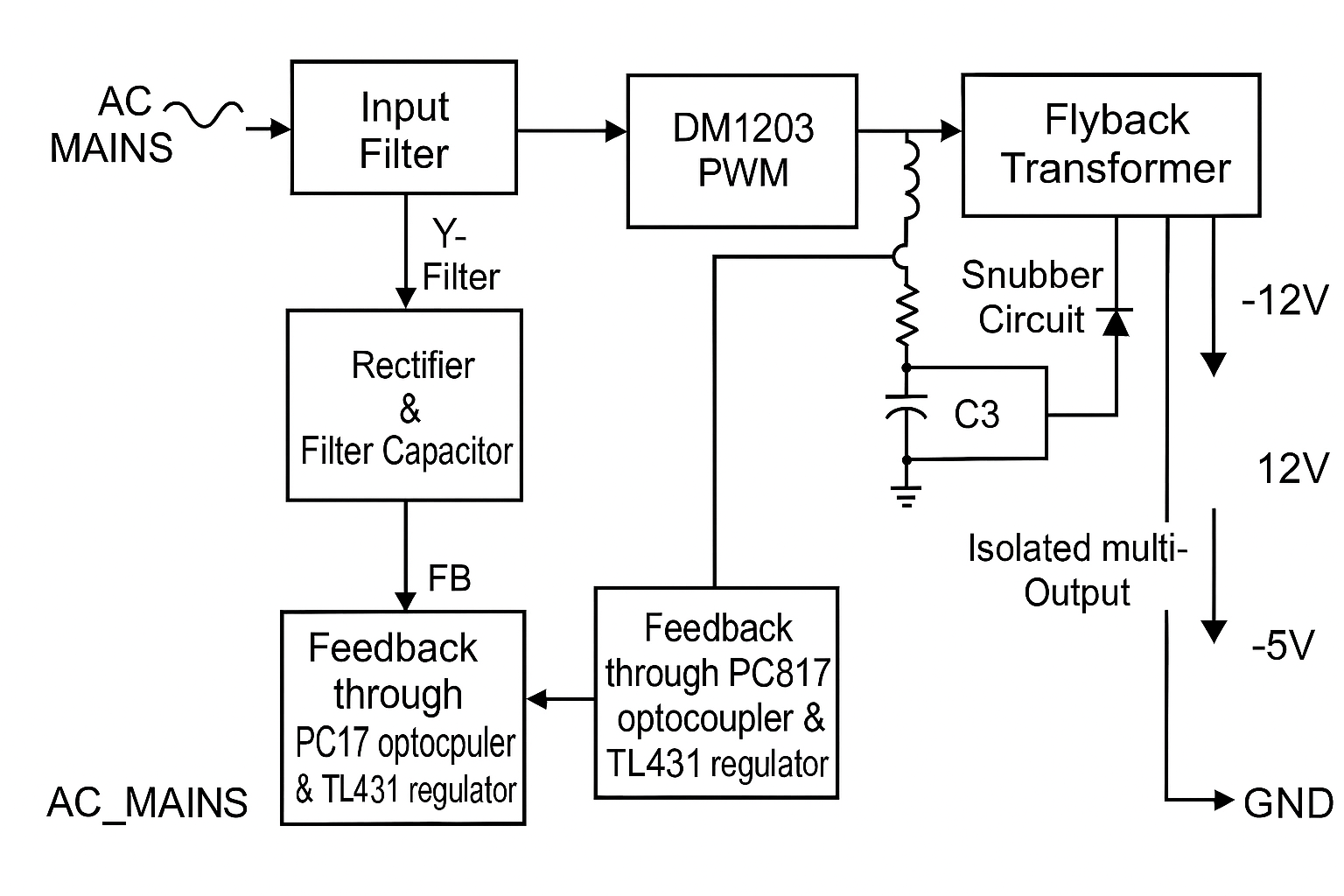
I’ve followed up and asked it to provide a block diagram too:
Prompt: sure block diagram is good
Response from GPT-5:
Parting thoughts
So there you have it Windows Copilot using GPT-5 model in particular is capable of being a patient super skillful engineer that could help you with hardware reverse engineering on demand. You only need some basic understanding of the subject you’d like to explore and a curiosity to try new things.
Bonus
After I’ve replaced the leaked capacitor with a new one and the DVD player works again.
Recently, I’ve read the Remembrance of Earth’s Past trilogy by Chinese author Cixin Liu and was very much impressed by it. This in turn awakened my fascination with hard science fiction and development of creative imagination. What I mean by creative imagination development is a technique that was promoted by Genrikh Altshuller who was inventor, sci-fi writer and the creator of The Theory of Inventive problem Solving (TRIZ). To provide some context that creative imagination development technique was conceived by Altshuller with the help of his students, such Pavel Amnuel, who himself is a prolific si-fi writer and astrophysicist.
Since I am interested in topic of guided inventions which Genrikh Altshuller was written about I intend to write a number of post related to how hard sci-fi ideas can be purposefully engineered, using the tools of creative imagination development technique.
“Find me papers that look at what happens to ketones while in ketosis. What interests me is how much energy lost with acetone and acetoacetate while in ketosis.“
The reply is below
🌟 Exploring Energy Loss During Ketosis: The Role of Acetone and Acetoacetate🌟
When our bodies enter ketosis—often due to low carbohydrate intake or fasting—we begin producing ketone bodies as alternative fuel sources. The primary ketone bodies are:
Beta-Hydroxybutyrate (BHB)
Acetoacetate (AcAc)
Acetone
While these molecules serve as vital energy sources, not all are utilized efficiently, leading to some energy loss. Here’s how it happens:
🔹 Energy Loss Through Ketone Excretion
1. Acetone Exhalation
Formation: Acetone is produced from the spontaneous decarboxylation of acetoacetate.
Excretion: Being volatile, acetone is exhaled through the lungs and also lost via urine and sweat.
Energy Implications: The exhaled acetone contains caloric energy that the body doesn’t recover—this represents direct energy loss.
2. Urinary Excretion of Acetoacetate and BHB
Renal Handling: The kidneys filter blood ketone bodies, reabsorbing most but not all. Excess ketones are excreted in the urine.
Energy Implications: The energy in these excreted ketones is also lost to the body. During high ketone production, urinary losses can be significant.
🔹 Key Research Findings
• Magnitude of Energy Loss
Quantitative Estimates: Energy loss through ketone excretion can range from 50 to 100 kilocalories per day in individuals in ketosis.
Influencing Factors: Depth of ketosis, metabolic rates, and kidney function affect the extent of ketone loss.
• Metabolic Adaptations Over Time
Increased Efficiency: With prolonged ketosis, the body adapts—kidneys enhance ketone reabsorption, and tissues improve ketone utilization, reducing losses.
Reduced Acetone Production: The body produces less acetone over time, minimizing exhaled energy loss.
• Clinical Contexts
Diabetes Mellitus: In uncontrolled type 1 diabetes, ketone production surges, and energy loss through excretion becomes more pronounced, contributing to weight loss.
Ketogenic Diets: Initial ketone losses are higher but tend to decrease as the body adapts to ketosis.
🔹 Understanding the Energy Calculations
• Caloric Content of Ketone Bodies
Beta-Hydroxybutyrate and Acetoacetate: Approximately 4.5 kcal per gram.
Acetone: While not a significant energy source, its loss still represents unused potential energy.
• Estimating Daily Losses
Urinary Ketones: Losing 10 grams of ketones via urine equates to about 45 kcal lost per day.
Exhaled Acetone: Though smaller in quantity, exhaled acetone adds to the total energy deficit.
🔹 Implications of Ketone Energy Loss
• Weight Management
Contributing Factor: Inefficient ketone utilization and subsequent energy loss may aid in weight loss by creating a caloric deficit.
Dietary Adjustments: Understanding this loss can help calibrate caloric intake for those on ketogenic diets.
• Metabolic Health
Efficiency Over Time: As the body adapts and reduces energy loss, dietary adjustments may be necessary to maintain weight loss momentum.
Monitoring Ketosis Levels: Regular testing of blood or urine ketone levels can inform about the state of ketosis and metabolic efficiency.
🔹 Additional Insights
• Breath Acetone as a Marker
Non-Invasive Monitoring: Breath acetone levels correlate with blood ketone levels, offering a convenient way to monitor ketosis.
Research Utilization: Used to estimate acetone production and associated energy loss.
• Ketone Metabolism Beyond Energy
Signaling Molecules: Ketone bodies play roles in gene expression, inflammation, and oxidative stress.
Therapeutic Potential: Minimizing unnecessary energy loss can enhance the benefits of ketogenic diets, especially in medical conditions like epilepsy or metabolic disorders.
🔹 Connecting the Dots
The loss of energy through acetone exhalation and acetoacetate excretion during ketosis, while seemingly minor, has meaningful implications:
Metabolic Efficiency: Highlights the balance the body achieves between utilizing alternative energy sources and conserving energy.
Dietary Planning: Emphasizes the importance of adjusting nutritional strategies as the body’s adaptation to ketosis evolves.
Health Outcomes: Offers insights that could improve interventions for metabolic diseases, weight management, and overall well-being.
Understanding the nuances of ketone metabolism and energy loss showcases the body’s remarkable adaptability! Whether for personal health goals or academic interest, delving into this area uncovers the intricate interplay between diet, metabolism, and energy utilization. 🌟
There are a number of ways to enter ketosis state.
First approach is to do it natively When you fast or follow a ketogenic diet (with less than 50 gr of carbs in a day) liver glycogen becomes depleted at some point and liver starts to convert fats (free fatty acids) into ketones.
There are three ketone types in the body: 1. Beta Hydroxybutyrate – BHB a primary fuel for the body 2. Acetoacetate – used for energy to a less extent (expelled in urine)
3. Acetone (isn’t used for energy and expelled in breath and urine)
Second approach is to take a supplement
It is also possible to enter into ketosis by taking supplements. There are three main types of them:
MCT Oil (or MCT Oil Powder) which stands for Medium Chain Triglycerides oil. It’s a purified Coconut Oil that retains only C8 and C10 fractions that are metabolized in the liver to ketones.
Ketone salts, use Potassium, Calcium, Magnesium, Sodium salts combined with BHB ketones.
Ketone esters which are a type of chemical compound that is converted to ketones and provides high level of ketosis in comparison to ketone salts and the effect of taking them lasts for hours, while ketone salts last for an hour or so.
My experimenting with exogenous ketones
The above mentioned supplements are known as exogenous (external) ketones since they can induce exogenous ketosis independent of the diet. It means that even though you may eat carbs and hence insulin level will be high you still will get into ketosis taking such supplements.
I’ve been taking MCT Oil, MCT Oil Powder, Ketone salts for months. So today I’ve decided to make a cocktail of all of them at once and see what happens.
Experiment setup On 14th hour of the fast I am mixing in 250 ml of carbonated water the following compounds:
9 grams of MCT Oil (I took 1 tablespoon of MCT Oil which is about 10 ml)
11 grams of MCT Oil Powder that contains 6 grams of MCT Oil.
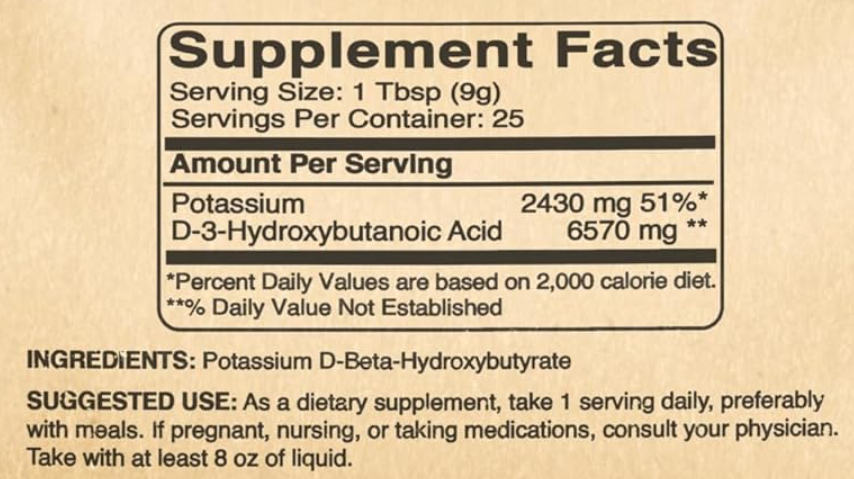
9 grams of Potassium D-BHB ketones salt that contains about 6.5 gr of BHB ketones.
One tablespoon of Raw Apple Cider Vinegar (about 10 ml)
In total:
15 grams of MCT Oil,
6.5 grams of BHB ketones.
This cocktail should bring my Acetone ketone level in breath which I can measure to about 0.5 mmol/l.
Notice A better and more exact way to measure ketones would be to measure BHB ketones concentration in blood using Blood Ketone Meter.













 ScienceAppliedForGood